How To Delete Books From A Kindle

So, you’ve got a Kindle. It’s like a magical little library that fits in your bag, right? But what happens when that library starts feeling like a cluttered garage? Suddenly,...

So, you’ve got a Kindle. It’s like a magical little library that fits in your bag, right? But what happens when that library starts feeling like a cluttered garage? Suddenly, you can’t find the book you actually want to read because it’s buried under a mountain of freebies you downloaded at 2 AM.
That’s where the zen art of deletion comes in. Clearing out your Kindle isn’t just about making space—it’s about curating your vibe. Think of it like Marie Kondo for your brain: does that dusty sci-fi novel spark joy? No? Then let it go.
The Two Big Questions: “Remove” vs. “Delete”
Before you start tapping, let’s clear up a little confusion. Your Kindle offers two options: “Remove from Device” and “Delete from Library.” These are not the same. It’s like the difference between putting a book back on the shelf (remove) versus tossing it into a bonfire (delete).
Must Read
“Remove from Device” is gentle. It takes the file off your Kindle to save space, but the book stays safe in your Amazon cloud account. You can download it again anytime. No strings attached, no heartbreak.
“Delete from Library” is the nuclear option. It wipes the book from your Amazon account entirely. If you haven’t downloaded a backup, that book is gone forever—poof—like a library card you lost in a swimming pool.
How to Actually Do It (The Simple Way)
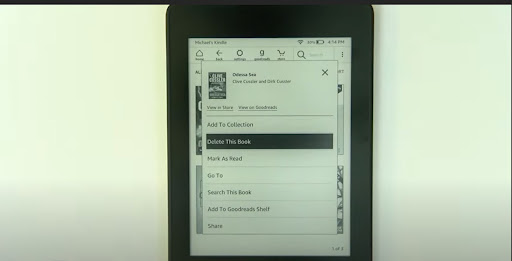
On your Kindle device, just press and hold the cover of the book you want to remove. A menu pops up. Tap “Remove from Device,” and it vanishes from your screen. You’ll feel a tiny weight lift—I promise.
If you want the full delete, you’ll need to go to your Amazon account on a computer or phone browser. Go to “Manage Your Content and Devices,” find the book, and click “Delete.” It asks for confirmation, which is nice—like a bouncer checking your ID before you leave the club.
 How Do I Delete Audio Books From My Kindle Fire? – TUHTOY
Why Bother? Isn’t Digital Space Infinite?
Great question. Technically, your Kindle has a storage limit, and if you’re like me, you’ve probably filled it with sample chapters and abandoned self-help guides. Clearing books makes your device faster—especially if your Kindle is older. It’s like deleting old photos from your phone; suddenly, everything loads in a snap.
But there’s a deeper reason. A cluttered library can actually mess with your reading mojo. When you open your Kindle and see forty unfinished books, it’s like walking into a party where you don’t know anyone. Where do you even start? By deleting the dead weight, you clear the mental fog. You can focus on that one story you actually want to finish.
Fun Comparisons to Keep You Going
Think of your Kindle’s home screen as your coffee table. You don’t leave twenty magazines and a half-eaten sandwich on it, right? No, you keep a crisp novel and a coaster. Same logic.
Or imagine your bookshelf as a playlist. You wouldn’t shuffle through fifty crap songs to find your favorite track, would you? No way. You curate that playlist. Your Kindle deserves the same respect. Delete the duds. Keep the bangers.
 How to Remove Books From Kindle Library? | The WiredShopper
What About Books You Bought? Is That Legal?
Totally legal! You own the license, not the atoms. Deleting a purchased book from your Kindle only removes your copy. Amazon still counts it in your purchase history, so you can re-download it later (as long as it’s still available on their servers). It’s a bit like a video game library—you don’t lose the right to play just because you archived the file.
But be careful: if you delete a library loan or a Kindle Unlimited book, it’s gone for good when the loan ends. No refunds, no tears.
Pro Tips for a Chill Experience
Try a “seasonal purge.” Every time the weather changes, go through your Kindle and remove books you know you’ll never read. It’s oddly satisfying, like clearing out your closet for summer.
And if you’re nervous about losing a book forever, just use the “Remove from Device” option. You can always download it again from the cloud. Think of it as putting the book in a magical storage unit that you pay for with zero dollars.
Lastly, remember: your Kindle is a tool for joy, not a chore. Deleting books isn’t about loss—it’s about making room for the next adventure. So go ahead, Evict the clutter. You’ll feel lighter. Your Kindle will feel faster. And your next great read will be waiting for you with open arms. Happy purging, friend.
