What Happens When You Reset Mobile Network Settings

So, your phone is acting up. The bars are gone. Texts won’t send. You’re staring at a tiny, spinning wheel of doom. And now, someone (probably you, in a panic) mutters the phr...
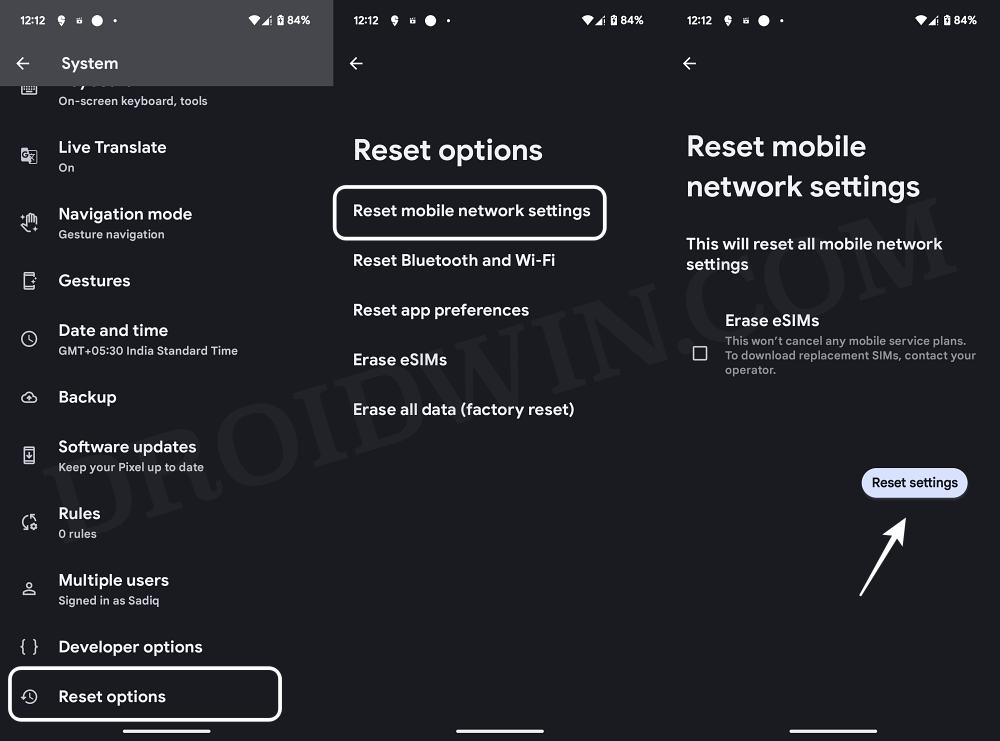
So, your phone is acting up. The bars are gone. Texts won’t send. You’re staring at a tiny, spinning wheel of doom. And now, someone (probably you, in a panic) mutters the phrase: “Reset Network Settings.”
Sounds scary, right? Like you’re about to reformat your brain. But chill. Take a breath. Let’s talk about what that button actually does over coffee. No jargon. Just real talk.
It’s not a phone factory reset. Promise.
This is the biggest misunderstanding. People hear “reset” and think their photos, apps, and embarassing search history vanish. Nope. Your photos are safe. Your contacts are still there. Your memes remain memes.
Must Read
Think of it like this: you’re not demolishing your house. You’re just resetting the Wi-Fi router in the basement. That’s all it touches.
Specifically, it wipes three things: saved Wi-Fi networks, Bluetooth pairings, and cellular settings. That’s the whole club. Nothing else.
Your Wi-Fi credentials? Gone. Like a bad date.
After you hit that reset button, your phone forgets every Wi-Fi password you’ve ever begged it to remember. Your home network? Woops. The coffee shop’s “FreeWiFi2022”? Vanished. You’ll need to type those passwords in again, one by one.
This is the part that annoys people most. But hey, it’s also a great chance to purge that creepy neighbor’s guest network you snuck onto once.
Pro tip: Don’t do this in a rush ten minutes before a Zoom call. You will be that person frantically asking the barista for the password.
Your Bluetooth devices? They get amnesia too.
Your wireless earbuds? The car’s hands-free? That weird keyboard you use at 2 AM? All forgotten. Every single Bluetooth pairing is wiped clean. The phone and the device act like strangers who met at a party and immediately forgot each other’s names.
You’ll have to re-pair everything. Put your earbuds back into pairing mode. Hold that button on your car’s dashboard for seven agonizing seconds. It’s like introducing two friends who already know each other. Awkward but temporary.
On the plus side, if your car had that janky connection that dropped every call, this is your chance to fix it fresh. Silver linings, my friend.
Your cellular settings get a reboot. This is the magic part.
Here’s where it gets juicy. Your phone’s ability to talk to cell towers? That’s a tiny, delicate dance. Sometimes the steps get corrupted. Your phone might insist on a specific network mode (like “LTE only”) when it should be doing the 5G electric slide.
A network reset throws those corrupted settings in the trash. It tells your phone, “Hey, forget whatever nonsense you think you know. Go find a tower again from scratch.”
 5 Fixes for Android Mobile Network State Disconnected
This often fixes dropped calls, data that refuses to load, and the dreaded “No Service” lie your phone tells you when you’re clearly in the city. It’s a digital slap in the face to bad signal. Sometimes that’s exactly what you need.
Why would you ever do this? (The real-world reasons)
Let’s be honest: you’re probably doing it because you’re desperate. Your phone won’t connect to 5G. Your texts are lost in limbo. You’ve tried the “turn it off and on again” trick twelve times.
It’s also a go-to fix when you switch carriers. If you popped a T-Mobile SIM into a phone that used to love Verizon, things can get confused. A network reset is like a hug that says, “It’s okay, you’re allowed to love a new provider now.”
Travelers, listen up: if you land in another country and your phone is clinging to your home network like a jealous ex, a network reset can shake it loose. It forces your phone to look for local towers with fresh eyes.
Okay, but what about my APN settings?
Ah, the secret sauce. APN (Access Point Name) settings are the little codes that tell your phone how to send MMS or use mobile data. Resetting network settings will wipe these back to the default ones your phone came with.
If you’re on a regular carrier like AT&T or T-Mobile, this is fine. The defaults work. But if you’re on some obscure MVNO (you know, the one with the tiny SIM card and the manual that’s 40 pages long), you might need to re-enter those APN details manually. Don’t panic. Just google “YourCarrier APN settings” and copy-paste like your phone’s life depends on it.
The aftermath: You’ll feel like a tech wizard (for an hour)
After the reset, your phone will reboot. The first few seconds are eerie. No bars. No Wi-Fi. You’ll feel naked. Vulnerable. Then, suddenly, the bars appear. A stronger signal than before. You’ll think, “Did I just fix the impossible?”
No. You just wiped a bad cache of network data. But enjoy that moment of glory. You’re a networking ninja now. You know the difference between a factory reset and a network reset. That puts you in the top 1% of phone users.
Still, brace yourself for the boring part: typing in your Wi-Fi password again. And your mom’s house password. And the gym’s “Guest@Gym2024”. It’s tedious. But put on a podcast, chug your coffee, and get through it. You’ve got this.
So, when your phone starts acting like a moody teenager, remember: a network reset isn’t the end of the world. It’s a fresh start for your signal. And sometimes, all a fussy connection needs is a little amnesia and a second chance.
